For people who need to post every day
You need videos every day. You don't have hours to make them. Now you don't need to.
The problem: posting works, but filming, editing and captions turn it into a second job. The fix: type one sentence and your laptop makes the finished reel, short, story, ad or YouTube video, with voice, captions and music. No camera, no editor, ₹0 per video. Paste a YouTube link and it cuts the best moments into reels.
The old way vs. a laptop and a sentence
Posting every day is what grows a page. Making the videos is what stops most people.
😩 Before
- Set up a camera, record, re-record
- 1–2 hours editing cuts and captions per video
- Monthly fees for AI video apps, with credit limits
- Hiring an editor for podcast clips
- Your language often missing or broken
⚡ Now
- Type one sentence in the dashboard
- Script, voice, captions, music and animation done for you
- Pay once, make as many as you like
- Paste a YouTube link, get reels and shorts
- Any language, with proper fonts and voices
Type → video
A real request and the three reels it produced, about three minutes later.
> Make 3 short Instagram reels about Excel shortcuts that save time: one in English, one in Tamil and one in Malayalam.
Your own video factory, on your laptop
Video Studio opens in your browser at localhost:4500. Type on the left, finished videos appear on the right. Everything renders on your computer, so there are no credits and no per-video cost.
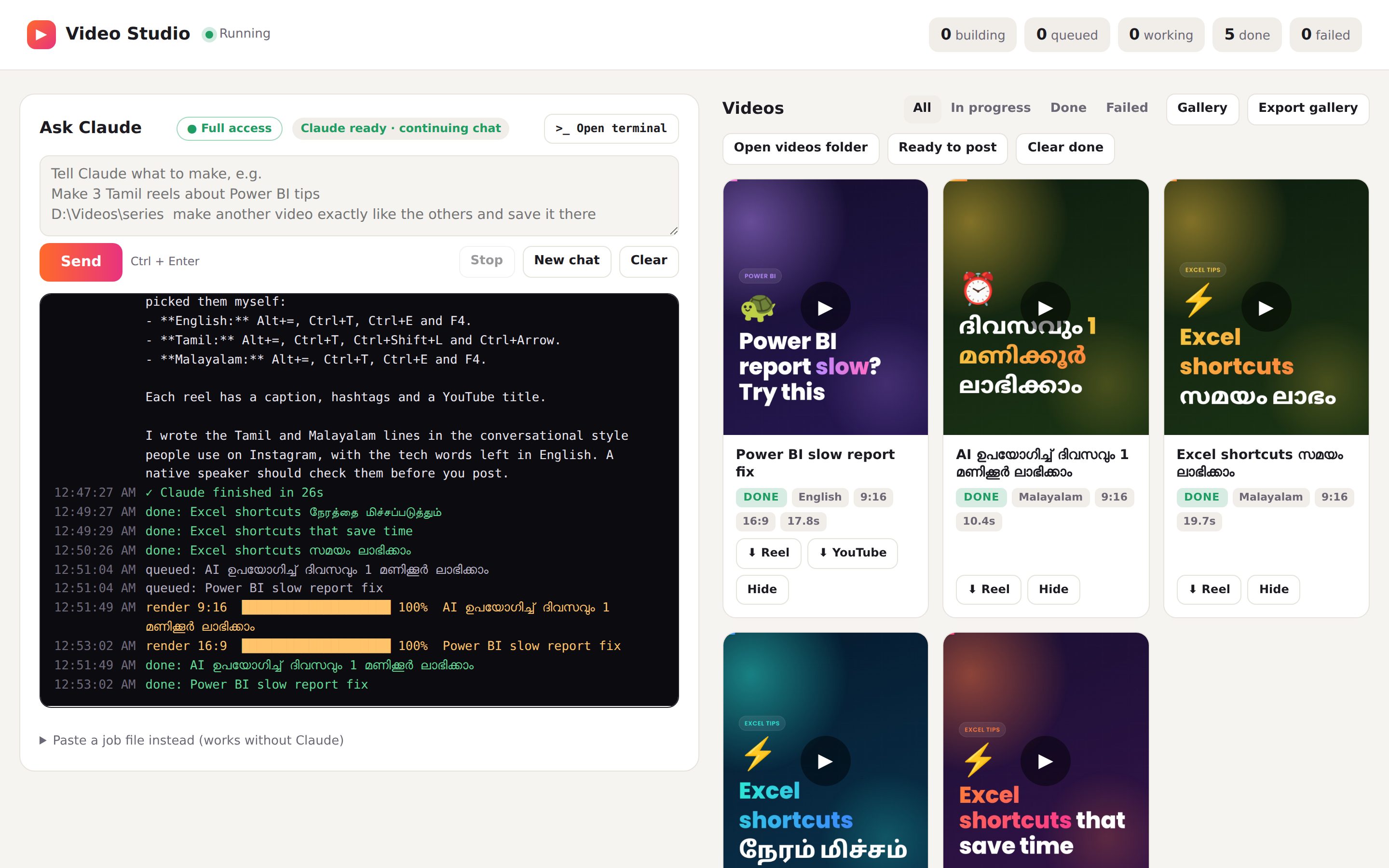
The real dashboard, mid-session, with the console showing every step.
- Say what you want. Topic, how many, which language. "Make 10 Power BI tips reels for beginners" is enough.
- Watch it work. The console shows Claude planning each video, then a progress bar for every render.
- Ask for changes. "Make the hook punchier", "use my brand colours", "now the same in Hindi". Claude edits and re-renders.
- Post. Each video lands in a Ready-to-post folder with its caption and hashtags.
> Make 3 short Instagram reels about Excel shortcuts…
Topics I chose: English covers core Excel shortcuts, Tamil covers AutoSum and fast navigation, Malayalam covers Flash Fill and F4.
write  jobs/building/excel-shortcuts-save-time-en.json
render 9:16  █████████░░░░░░░░░░░  46%  Excel shortcuts that save time
write  jobs/building/excel-shortcuts-save-time-ta.json
✓ Claude finished in 26s
done: Excel shortcuts நேரத்தை மிச்சப்படுத்தும்
done: Excel shortcuts that save time
done: Excel shortcuts സമയം ലാഭിക്കാം
Everything it can make
One tool for every kind of short video. Each one below came out of Video Studio.
Paste a link. Get reels and shorts.
Claude reads the whole transcript, picks the strongest moments, and Video Studio cuts each one into a full-screen reel.
- Big word-by-word captions
- B-roll clips and real photos
- Transitions, sound effects, music under the voice
- Works on your own recordings too, transcribed offline
https://youtu.be/… make 3 reels from this podcast with B-roll and music
So we started the channel with no plan at all, just…
The one habit that doubled our views was posting at the same time every day.Reel 1
And then the sponsor thing happened, which we can talk…
Nobody tells you this: your first hundred videos are practice, and that's fine.Reel 2
If you only remember one thing, reply to every comment in the first hour.Reel 3
Animated videos without After Effects
Kinetic text, icons, charts and phone mock-ups, designed by Claude for each idea. Use them as full videos or as B-roll inside other edits.
Make an animated promo for my course, 9:16, 45 seconds
Story videos, scene by scene
Faith stories, history, kids' stories, motivation. Claude writes the story, paces the scenes and voices the characters, and you can continue the series episode after episode. Tap the story for sound.
C:\JESUS make the next episode like this one
Edit your own footage with Claude
Give it your product photos or phone videos. It cuts them together with titles, captions, music and a call to action, in your brand's style.
D:\Shop\terracotta make a 20-second ad from these photos
Teach anything in 30 seconds
Hooks, numbered tips, before/after cards and animated charts. Ask for the YouTube version too and the same script comes out in 16:9.
Make 10 reels about Power BI tips, Reel and YouTube versions
Any language. Any script.
Ask in any language and Claude writes the script the way people there actually talk online. A matching AI voice reads it, letters never break apart, and right-to-left languages read the right way.
What buyers say
Also inside
- 🔁Continue a series. Point it at a folder of your videos and ask for the next episode in the same style.
- 🎤Your own voice. Optional: clone your voice from a short recording and use it offline.
- 🎬HyperFrames motion design. Launch videos and logo reveals built with the open-source framework.
- 📁Ready-to-post folder. Every video with its caption and hashtags. No watermark.
- 🖼️Gallery page. All your videos on one page, ready to share with a client.
- ⌨️Terminal for power users. One button opens Claude Code in your terminal; progress still shows in the dashboard.
Who it's for
Creators
A reel every day, in the language your followers speak.Make 7 reels for this week about study tips.Coaches and podcasters
Turn every episode and live session into a week of clips.https://youtu.be/… make 5 reels from this.Small businesses
Product ads and offers from your own photos, without an editor.Make 3 reels about our new collection.Freelancers and agencies
Make client videos on your laptop. No per-video cost eats your margin.D:\Clients\Cafe make 10 more like these.In the download
- 🎬Video Studio app for Windows and Mac, with one-click Setup and Start files.
- 📘Complete PDF guide: 20 lessons from installing Claude Code to podcasts, your own voice and fixes for common errors.
- 🧭Online setup guide with copy buttons for every command.
- ✍️Example requests to learn from and reuse.
Your laptop needs
Windows 10 or 11, or macOS 13 or newer. 8 GB memory, about 10 GB free disk space, and internet for Claude and the AI voices. Plus your own Claude Pro or Max plan from claude.ai.
Who made this
I'm Aswathy, a software engineer and creator in Chennai. I make teaching videos in English, Tamil and Malayalam, and I built Video Studio because I wanted to post every day without spending every evening editing.
FAQ
Do I need to know coding?
No. During setup you paste two commands into a terminal, and the guide shows exactly what to paste and what you should see. After that, everything happens in the dashboard in plain English.
Is Claude included in the price?
No. Video Studio runs on Claude Code, which comes with a Claude Pro or Max plan that you buy from claude.ai. If you already pay for Claude Pro, you have everything you need.
Is it a subscription?
No. You pay once for Video Studio. The only ongoing cost is your own Claude plan.
Do I need a camera or an editor?
No. Animated videos need nothing but a sentence. If you have your own recordings, photos or a podcast, it edits those too.
Can it make reels from YouTube videos?
Yes. Paste the link and it picks the best moments and edits them into reels. Clip your own content or get the creator's permission, because platforms can mute or remove clips of shows you don't own.
Will it run on my laptop?
If it has Windows 10 or 11 (or macOS 13 or newer), 8 GB of memory and about 10 GB of free space, yes. Older laptops render more slowly.
How many videos can I make?
As many as you like; there's no per-video limit from Video Studio. How many you make in a day depends on your laptop's speed and your Claude plan's usage limits.
Which languages does it support?
Any language. Claude writes the script in it, a free AI voice reads it, and captions use the right fonts and text direction.
Can I use the videos for clients?
Yes, the videos you make are yours. Music you add must be licensed for your use. Stock clips and photos follow their free licences, and photo credits are added to your caption file automatically.
How do I get it after paying?
Right after payment you go to your download page, and the link is also emailed to you. You can come back any time at your download page with your email and the payment ID from your Razorpay receipt.
What if I get stuck during setup?
The guide has fixes for every error we've seen. If you're still stuck, email us with a screenshot and your purchase email.